Benchmarking My Own Unity CLI, Then Fixing What It Found
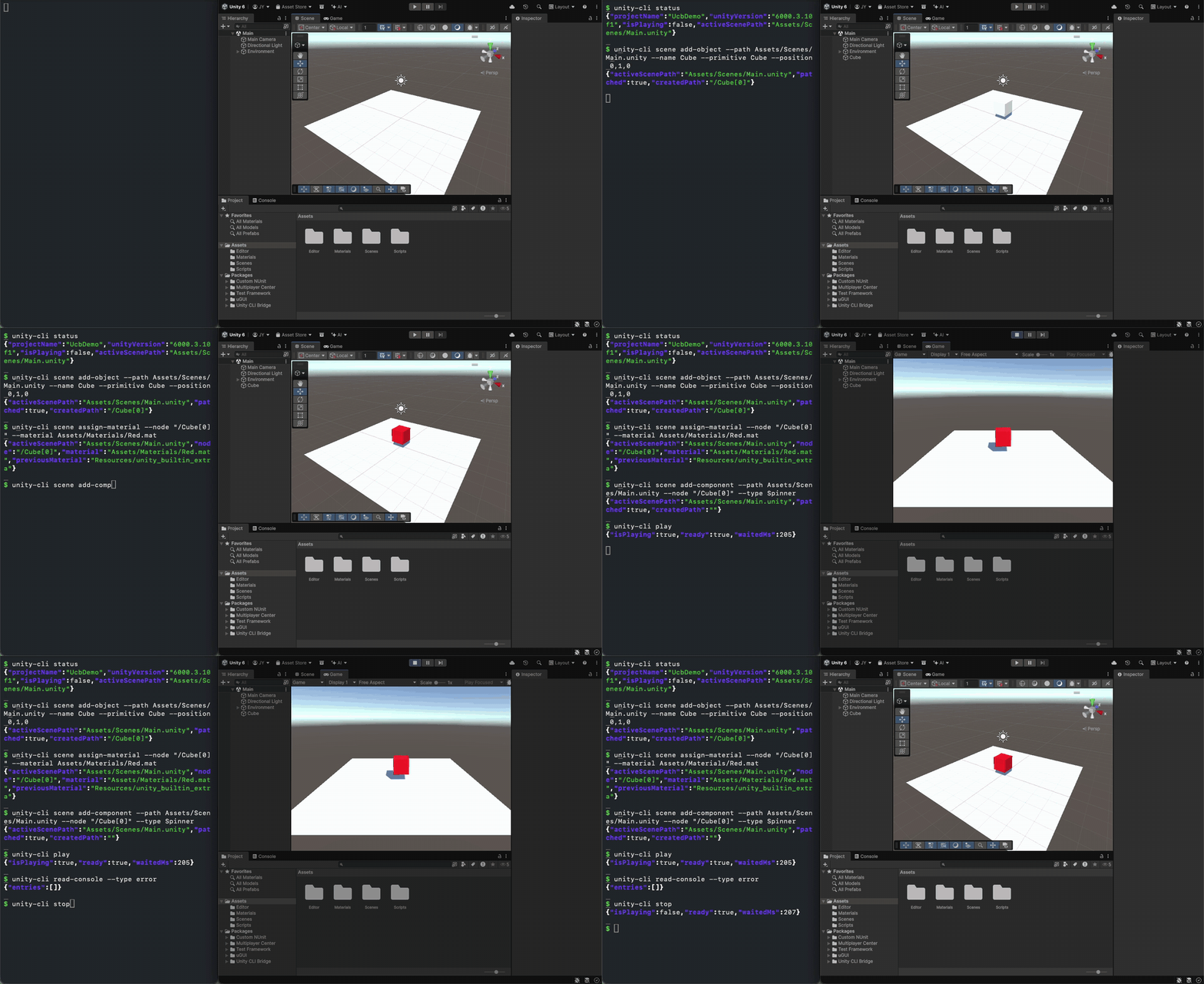
20 seconds of real commands from the v0.5.6 CLI: create a cube, assign a material, add a script, enter Play Mode, check the console, stop. The JSON output is shortened for display.
unity-cli-bridge is a command-line interface for the Unity Editor. You run a command in a terminal, it reaches the open Editor over local IPC, and it prints JSON. Version 0.5.6 is out on GitHub and itch.io.
This post covers why I built it, how I benchmarked it against three other tools, what the benchmark exposed in my own tool, and what changed after I fixed it. I ran the benchmark myself, so read the numbers with that in mind. I come back to this near the end.
Why I built it
I wanted scripts and AI coding agents (Claude Code, Codex, Grok Build) to work in the Unity Editor the way they already work in a shell: run a command, read the result, decide what to do next.
Most Editor automation I'd seen took one of two shapes:
- A server in the middle. A Python or Node process wraps dozens of actions, and every call goes through it before it reaches the Editor. That's one more process to start and one more thing that can break.
- Raw C# execution. You send C# to the Editor and read results back from the log. It's flexible, but the caller has to write correct C# every time, and reading the result often takes a second call.
I wanted something in between: declarative commands over a direct connection.
CLI ──── local IPC ──── Unity Editor (bridge)
         (named pipe on Windows, Unix socket on macOS)
So scene add-object --primitive Cube --position 3,0,0 instead of writing C#. The caller picks options, not APIs. Every command returns JSON on stdout right away. Flags like --output compact and --omit-defaults keep that JSON short, because an agent pays for every token it reads. When no command fits, execute still runs C# as a fallback.
An agent skill ships with the project. It teaches the agent to pick the right command, inspect before patching, and check read-console after changes.
The benchmark
Having a design idea is one thing. I wanted to know whether it actually helps an agent on a real project, so I set up a comparison.
- Four tools: unity-cli-bridge, the official Unity CLI, and two community tools I call Tool A and Tool B. Tool A is built around fast dynamic C# execution. Tool B is an MCP server.
- Four tasks, each with a fixed English prompt, on a mid-sized Unity 6 URP project with an existing codebase, nested prefabs and large serialized data. Not an empty sample.
- One agent: Claude Code with Opus 5.5 at low effort, headless, one run at a time, on one Mac mini with Unity 6000.3.10f1.
- A hidden verifier. After each run, EditMode/PlayMode tests the agent never saw checked the result. A run passed only if every hard check passed with no new compile errors.
- Isolation. Each run started from a fresh copy of the project, and the agent got only that tool's own skill or plugin. Permission rules and a hook blocked it from reading any tool's source code on disk.
The tasks were a scene audit and fix (s1c), the same audit with C# forbidden (s1q), a pause-menu UI (s3), and 20 prefab variants (s4). Only valid runs count in the numbers below. The wiki page lists what was excluded and why.
What it found in my own tool
My first commands-only (s1q) runs used an older main (04778d6). The agents passed, but they were slow: a mean of 332.8 s and $1.127 per run over 2 runs, with 40 tool calls on average. Reading the transcripts, I could see why. The agents fell back to grepping and parsing the scene and prefab YAML by hand. That is the same fallback I saw in other tools' runs on this task.
The task needed the agent to see disabled renderers inside nested prefabs. With --omit-defaults, scene inspect dropped enabled state and nested prefab information as if they were defaults, so that state wasn't in the output. The scene patch spec also wasn't shipped with the skill, so the agent had nothing to open when it needed the format.
One detail from the excluded runs stuck with me. Two early baseline runs were thrown out because the agent read unity-cli-bridge's package source on disk before I tightened isolation. Reading the source had made those runs faster. The agent was filling a gap in the tool's output by reading its code.
The fix: PR #205
PR #205 addressed what the transcripts showed:
scene inspect --omit-defaultsnow keeps enabled state and nested prefab information instead of dropping it.- The scene patch spec ships inside the skill as a reference file, so the agent can open it when it needs it.
scene patchsuggests the closest valid operation when it gets an unknown one.prefab inspectaccepts model files (.fbx).qa world-dumpworks in Edit Mode.
None of these are big changes. The first two are the ones aimed directly at what the transcripts showed.
Re-measured
On the same commands-only task, with main at 9f53c04 (which includes PR #205 and became v0.5.6):
| s1q (commands only) | Runs | Pass | Wall time, mean | Cost, mean | Tool calls, mean | Output tokens, mean |
|---|---|---|---|---|---|---|
Before (04778d6) | 2 | 2/2 | 332.8 s | $1.127 | 40 | 15,144 |
After PR #205 (9f53c04) | 5 | 5/5 | 119.9 s | $0.465 | 13 | 5,626 |
That's 64% less wall time and 59% less cost on this task. The agents now read the scene with scene inspect --omit-defaults, then fix it with scene add-component and scene patch.
Here is how the four tools compared on that task (5 runs each):
| s1q | unity-cli-bridge | Official Unity CLI | Tool A | Tool B |
|---|---|---|---|---|
| Pass | 5/5 | 5/5 | 4/5 | 5/5 |
| Wall time, mean | 119.9 s | 224.1 s | 454.9 s | 216.2 s |
| Wall time, median | 84.7 s | 232.8 s | 250.8 s | 181.6 s |
| Cost, mean | $0.465 | $0.897 | $1.659 | $1.977 |
On the three tasks where C# was allowed, the picture was much flatter. All four tools passed every run, and every agent ended up doing the work through 1–5 C# snippets whatever tool it had. Most of the time differences were within run-to-run noise, and cost mostly tracked how much context each tool loads up front. unity-cli-bridge had the smallest first-turn context of the four, about 14.1k tokens.
The lesson I took from this: on scene work, most of the gap came from whether a tool's read output already contained the state the agent needed. When it didn't, the agent went digging through YAML, and time and cost multiplied. That held for my tool before the fix as much as for anyone else's.
Where it isn't ahead
- Code execution speed. Tool A runs C# about an order of magnitude faster per call: about 19 ms in Edit Mode, against about 0.5 s for a new
executesnippet in unity-cli-bridge, which still compiles each new snippet. For work that runs many small snippets, like driving Play Mode frame by frame, that matters more than anything above. - C#-allowed tasks. Tool A was fastest on two of them (s1c and s3). If an agent is going to write C# anyway, any of the four tools is fine.
- An unexplained slow run. One of my s1q runs (r4) took 295.3 s against a median of 84.7 s. Most of that was tool time, and I haven't found out why yet. It pulls the mean well above the median.
Limits and bias
I want to be direct about this part.
- I built the tool, wrote the benchmark, ran it, and fixed my own tool between rounds. The other tools were measured once, as released, with no chance to tune against these tasks. I tried to keep it fair with fixed prompts, a hidden verifier and source isolation, but the bias is real.
- The before/after is not a general speed-up. The fixes target failures I saw in this benchmark, and I re-measured on the same task. Read it as "this specific gap is closed".
- Small samples. 5 runs per tool for s1q, 3 for the others, and 2 for the old baseline. One slow run moves a mean a lot, so treat differences of 10–20% as noise.
- Narrow setup. One model at one effort level, one client, one machine, one Unity version, four tasks on one project. A different model or client could rank the tools differently.
The full tables, methodology and excluded runs are on the wiki.
What's next
Two known bugs, both open:
- #210:
scene set-transformresets the fields you leave out.--rotation 0,30,0alone also sets position and scale to 0. For now, pass position, rotation and scale together. I found this while recording the demo GIF. - #208:
read-console --type errordoesn't include Exception entries.
I also still need to look into the slow r4 run.
unity-cli-bridge is a personal side project, maintained on a best-effort basis in my spare time. Bug fixes and compatibility with new Unity versions come first. Issues and pull requests are welcome, but there's no guaranteed response time.
Links
- itch.io: yhkk.itch.io/unity-cli-bridge
- GitHub: github.com/yhc509/unity-cli-bridge
- Release: v0.5.6
- Benchmark: Benchmark v0.5.6 on the wiki
- PR: #205