unity-cli-bridge
A command-line interface for the Unity Editor. Scripts and AI coding agents handle scenes, prefabs, assets, tests, and Play Mode checks with one command each and get the result back as JSON.
Role
Solo side project, from design and development to release
Links
Highlights
- The CLI talks straight to a running Unity Editor over local IPC. There is no server in the middle.
- Scenes, prefabs, materials, assets, packages, and the Test Runner are driven by declarative commands instead of C# code.
- Every command returns JSON, so scripts and AI agents can read the result right away.
- Play Mode QA, recording, and profiling all work from the terminal.
- Supports Unity 2021.3 LTS and newer, including Unity 6, with CLI builds for macOS Apple Silicon and Windows x64.
Why I built it
Whenever I handed Unity work to an AI coding agent, it stalled at the Editor. It could fix code fine, but placing objects in a scene, editing a prefab, or checking the result in Play Mode still meant a person clicking through the Editor.
Tools for this already existed, and they mostly took one of two routes. One puts a Python or Node server in the middle and has that server pass commands to the Editor. The other sends whole chunks of C# to run and then digs the result out of the log. The first has more steps, so more places to break. The second needs correct C# written fresh for every call.
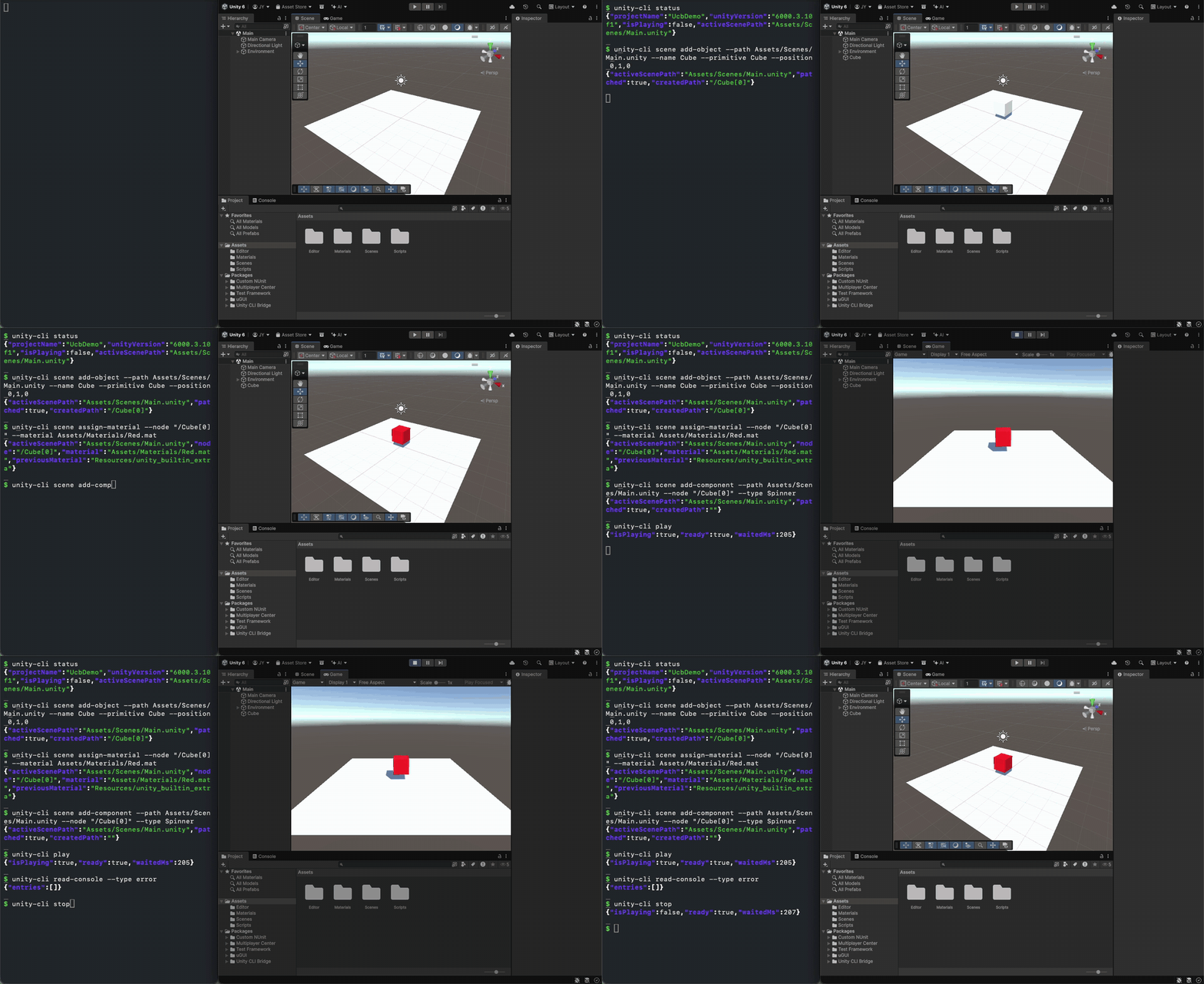
So I took a third route. A terminal command reaches the open Editor directly, you choose what to do with options, and the result comes back right away as JSON.
How it works
Add the package to a Unity project and the bridge starts when the Editor opens. The CLI talks to it over a Named Pipe on Windows and a Unix socket on macOS.
CLI ──── local IPC ──── Unity Editor (bridge)
A command like scene add-object --primitive Cube --position 3,0,0 creates a cube and prints what was created as JSON. A bad option is not silently ignored; you get told what was wrong. Long responses cost an AI agent tokens, so there are options that drop unneeded values and return a shorter result.
If the Editor is closed, editor launch starts it, and it also runs headless in batch mode. An agent skill ships in the repo so AI agents can use these commands right away.
Install
Get the package as a .unitypackage from the itch page or GitHub Releases, or add it by Git URL in the Package Manager. The CLI installs with one button from Window > Unity CLI Manager in the Editor. Full install steps and the command list are in the README and docs on GitHub.
Status
This is a side project I keep working on in my spare time. Bug fixes and compatibility with new Unity versions come first. Issues and pull requests are welcome, but replies may be slow. How it compared with other tools, and what I fixed afterward, is in the post below.